
Data-centre AI for your own library.
Describe, search, restore, upscale, caption and narrate with 35 AI models, from fast compact models to the largest open vision models, on GPUs with up to 141 GB of memory. You see what’s sent and the estimated cost before anything runs.
What the models can do.
Each one runs only when you start it, on the photos, clips, audio or script you choose.
Descriptions
Turn photos into searchable descriptions and tags, from a fast compact model to a 100-billion-plus-parameter vision model.
Smart search
Index your library so you can search for “canoe on a mountain lake” or “birthday cake”, including multilingual models.
Faces
Detect and match faces to build People. Grouping, naming and searching still happen on your server.
Enhance & upscale
Sharpen and enlarge small images, from a quick 4× upscale to generative restorers that rebuild lost detail.
Portrait restoration
Bring blurred or damaged faces in old portraits back into focus while the rest of the photo is upscaled.
Video restoration
Faithful mode cleans noise and compression. Creative mode rebuilds fine detail in very small or old footage.
Smooth motion
Create in-between frames for slow motion or smoother playback in Studio.
Transcription
Turn speech into editable captions and transcripts, ready to correct in Studio.
Voice-over
Write a script and get natural narration for a Studio project, in the voices the model offers.
 BeforeAfter

A red canoe floats on a calm turquoise lake, with pine forest and snow-capped mountains behind it under a partly cloudy sky.
- canoe
- lake
- mountains
- forest
- summer
A model for every job.
Each tool offers a lineup from light to heavy. Start with the default; step up when a job deserves more detail, more languages or more care, and the estimate shows the difference.
Descriptions
11 vision-language models- Qwen2.5-VL 3B
- Qwen3.5 4B
- Qwen2.5-VL 7B
- Qwen3.5 9BDefault
- Pixtral 12B
- Qwen3.5 27B
- Qwen2.5-VL 32B
- Qwen3.5 35B-A3B
- Qwen3.5 122B-A10B
- Qwen2.5-VL 72B
- Pixtral Large
Enhance & upscale
7 image restorers- Real-ESRGAN + GFPGANDefault
- CodeFormer
- HAT
- SeedVR2 3B
- SeedVR2 7B
- FLUX.1 Upscaler
- SUPIR
Video restoration
5 video restorers- RealBasicVSRFaithfulDefault
- SeedVR2 3BCreativeDefault
- SeedVR2 7B
- Upscale-A-Video
- VEnhancer
Smart search
6 search models- CLIP ViT-B/32
- SigLIP2 B/16
- SigLIP B/16 384Default
- NLLB-CLIP200 languages
- SigLIP2 SO400M
- SigLIP2 g-opt
Faces
2 face models- buffalo_lDefault
- antelopev2
Transcription
3 speech models- Parakeet
- WhisperDefault
- Canary
Voice-over & motion
2 Studio models- KokoroVoiceDefault
- RIFEMotionDefault
The lineup is rolling out by release and region. The model list in each tool shows what your server can use today, with its input limits and quality choices.
The right GPU for the job.
Every model runs on hardware sized for it, so a quick upscale doesn’t pay for a data-centre GPU and a 122-billion-parameter model gets the memory it needs.
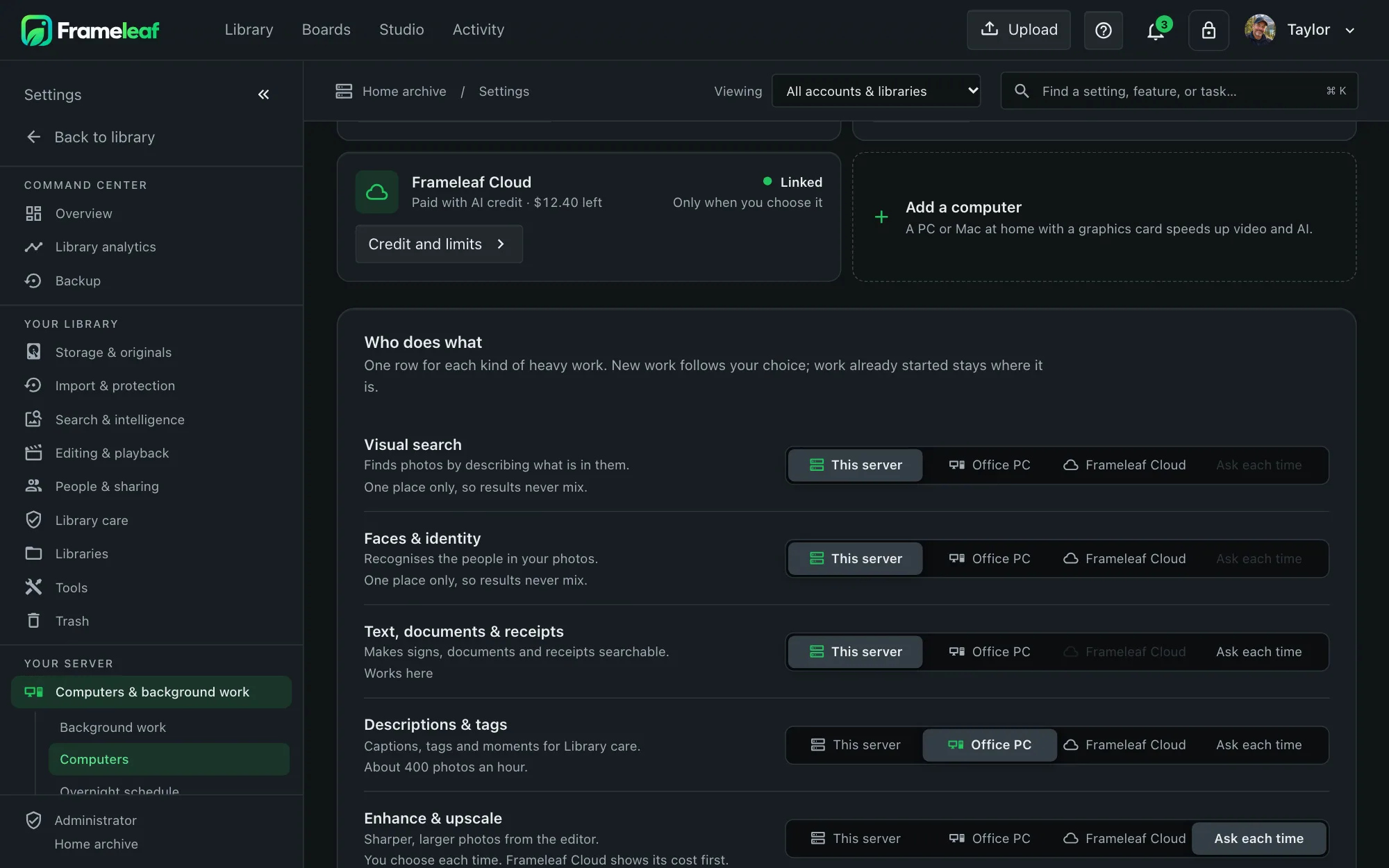
You choose where every job runs.
Mix and match: keep faces at home and send a big restoration to the Cloud, or run everything locally. A local job never silently becomes a Cloud job, and automatic descriptions have their own opt-in and budget.
- White runs on your server's processor.
- Green fits the GPU you already have.
- Blue identifies a Cloud option; review its availability, consent and cost.
Know the cost before you start.
Cloud jobs use a prepaid AI credit balance. You pay for the GPU time the job uses, not a subscription.
Review
Pick a model and see what will be sent and the estimated cost range. Start with a small sample to judge the result.
Hold
The estimate is reserved in your AI Wallet while the job runs, within the spending limits you set.
Settle
You’re charged for the work done; the rest returns to your balance. Frameleaf or provider failures release or refund the charge.
Cancelling after work starts, or invalid input, can still incur the work done and a minimum charge. Review any start fee and the wallet’s expiry and refund terms before spending.
Private by design.
Only what the task needs
Image copies have location and camera metadata removed. Restoration video leaves audio at home; transcription sends the selected audio, and voice-over sends your script.
Temporary processing
Cloud workers read the selected inputs to process them. Job files use temporary storage with a 24-hour retention limit; account and job records are separate.
Search and faces stay yours
If an administrator sends smart search or faces to the Cloud, it reads a metadata-stripped preview. Grouping faces into people, naming them and reading your searches stay on your server.
Locked stays home
Items protected by Locked encryption never go to the Cloud. Text recognition and final Studio exports always run on your own network.
Consent you control
An administrator accepts the processing terms and decides who may spend. Turn off automatic processing whenever you like.